

Key Takeaways
Over 90% of hacking tools are built for Linux, not Windows
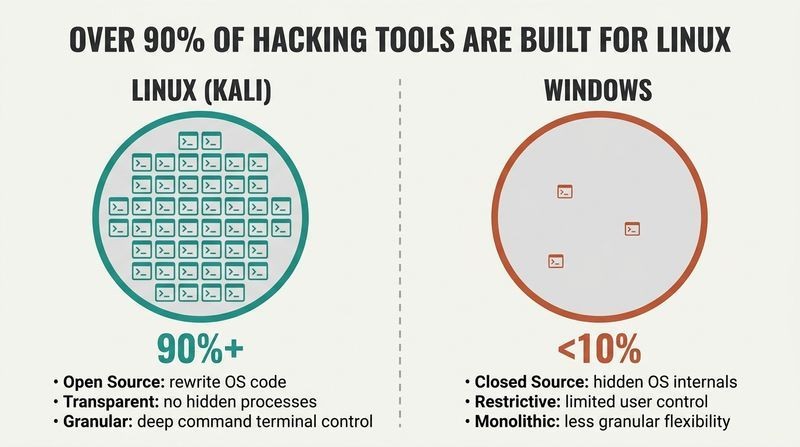
Linux is the hacker's native tongue. OccupyTheWeb, a former college professor who has trained NSA, CIA, and FBI personnel, argues that Linux fluency is the single biggest barrier separating aspiring hackers from professionals. The reasons are structural, not stylistic:
1. Open source: you can read and rewrite the operating system's own code.
2. Transparent: every working part is visible, unlike Windows' hidden internals.
3. Granular: the terminal controls the system down to the smallest detail.
4. Ubiquitous: two-thirds of web servers and over 80% of mobile devices run Linux or Unix.
The book uses Kali Linux, a Debian-based distribution built by Offensive Security with hundreds of penetration-testing tools preinstalled, saving hours of manual downloading.
The claim is sound but worth contextualizing. Linux dominance in security tooling is partly historical path-dependence: early hackers used Unix, so tools accreted there, which drew more hackers, a self-reinforcing loop. What's striking is how this mirrors network effects in any ecosystem, from programming languages to app stores. The counterpoint is that modern red teams increasingly operate in Windows-heavy enterprise environments and lean on PowerShell, C2 frameworks, and cloud consoles. Linux mastery remains foundational, but treating Windows as irrelevant is a mistake the book itself softens by covering WSL. Fluency in the attacker's tools should not become blindness to the defender's terrain.
Practice on a Kali virtual machine, never your real operating system
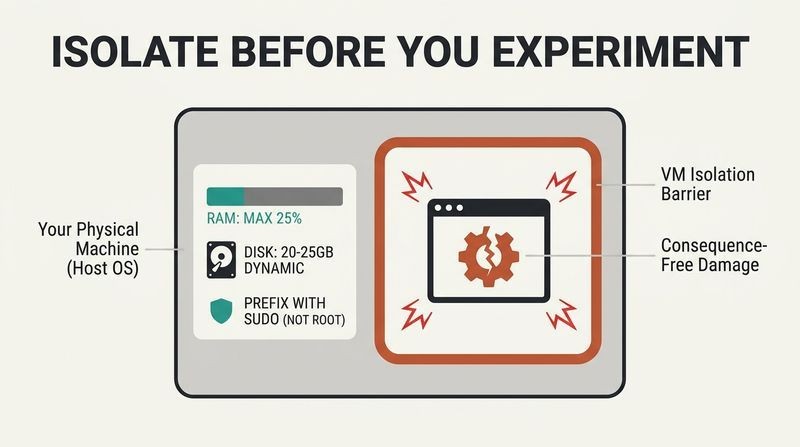
Isolate before you experiment. Rather than overwriting your existing OS, the book teaches installing Kali Linux inside a virtual machine (VM), software like Oracle's free VirtualBox that runs a full guest operating system inside your host. This lets you break, misconfigure, and rebuild without consequence. Key setup rules: allocate no more than 25% of physical RAM to the VM, give the virtual disk 20-25GB (dynamically allocated so it only consumes space as needed), and use the graphical installer.
The second edition made a deliberate safety change: every command requiring elevated privileges is now prefixed with sudo rather than logging in as the all-powerful root user. Operating as root full-time means anyone who compromises your session instantly owns your machine.
The VM-first philosophy reflects a deeper principle in security education: create a sandbox where failure is free. This is the same logic behind flight simulators, cyber ranges, and vaccine attenuation. The sudo-over-root shift also encodes the principle of least privilege, a cornerstone of modern security engineering formalized by Saltzer and Schroeder in 1975: grant only the access strictly necessary, only when necessary. Beginners often resent typing sudo repeatedly, but that friction is pedagogical, forcing conscious awareness of when they are wielding dangerous power. The habit transfers directly to defensive work, where privileged-access management is now a multibillion-dollar discipline.
The terminal gives control no graphical interface can match
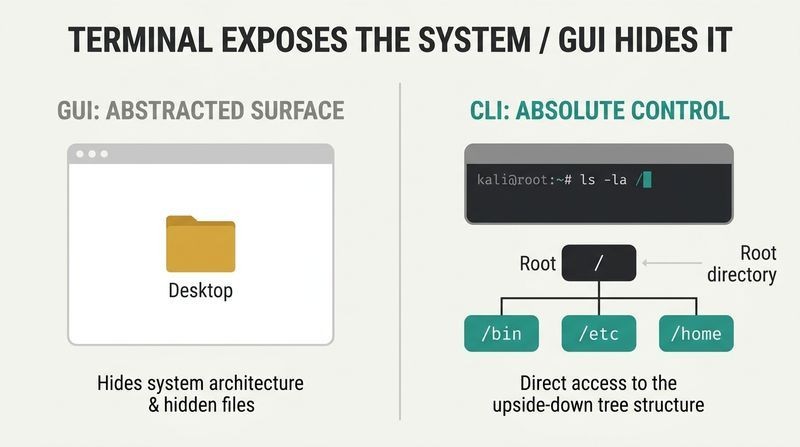
Everything in Linux flows through text. The book front-loads the command line because the GUI hides the machinery hackers need. Core navigation commands do the heavy lifting: pwd shows your current directory, cd moves you around, ls lists contents (add -l for detailed listings, -a to reveal hidden files). Finding things has a toolkit: locate searches a daily-updated database, whereis finds binaries and manuals, which finds executables in your PATH, and find performs powerful real-time searches by name, date, owner, or permission.
The filesystem is an upside-down tree with / (root) at the top, branching into /etc for configuration files, /home for user files, /bin for application binaries. Unlike Windows, Linux is case-sensitive: Desktop, desktop, and DeskTop are three different names.
The terminal's supremacy is not nostalgia. Text interfaces are composable in ways graphical ones cannot be: commands chain via pipes into arbitrary new tools, a philosophy Doug McIlroy crystallized at Bell Labs as writing programs that do one thing well and connect through text streams. This is why the command line has outlived four decades of GUI hype. The cognitive cost is real, though. Research on interface learnability shows command lines have brutal onboarding curves but higher expert ceilings. The book's bet, well supported by how professionals actually work, is that the ceiling matters more than the curve for anyone serious about the craft.
grep and pipes turn oceans of output into single answers
Filter relentlessly. Text manipulation is central to Linux administration because nearly every configuration is a plaintext file. The book's most-praised tool is grep, which filters text for keywords. Its real power emerges through piping (the | symbol), which feeds one command's output as another's input. To find whether the Apache web server is running among hundreds of processes, you pipe the full process list into grep searching for apache2, collapsing a screen of noise into two relevant lines.
Supporting cast: head and tail show the first or last lines of a file, nl numbers lines, sed finds and replaces text (useful for un-munging password lists, where hackers reverse tricks like swapping o for 0), and less lets you scroll and search interactively within large files.
Piping embodies compositional thinking, the same principle behind function composition in mathematics and Unix's enduring design elegance. What's underappreciated is how grep-and-pipe fluency rewires problem-solving: instead of hunting for a purpose-built tool, the practitioner assembles a bespoke one in seconds. This maps onto what cognitive scientists call combinatorial creativity, generating novel solutions by recombining simple primitives. The sed password-munging example is quietly profound: it shows how defensive folk wisdom (replace letters with numbers) gets mechanically defeated at scale. Security is an arms race of automation, and the side that scripts faster usually wins. Manual cleverness rarely survives contact with a determined attacker's for-loop.
Spoof your MAC and IP to appear as a trusted device
Your network identity is editable. The book demystifies networking as reconnaissance and evasion. The ifconfig command reveals and rewrites active interfaces. You can assign a new IP address, change your netmask and broadcast address, and crucially spoof your MAC address (the supposedly unique hardware identifier burned into your network card) by bringing the interface down, assigning a fake address, and bringing it back up. Since MAC addresses are often used as a security gate, spoofing neutralizes that control.
DNS becomes an attack surface too. The dig command harvests a target's nameservers, mail servers, and subdomains as early reconnaissance. Editing the /etc/hosts file lets you redirect a domain like a bank's website to a malicious server you control on the local network.
These techniques sit at the ethical fault line the book straddles. MAC spoofing and DNS redirection are dual-use: the same commands that let a penetration tester validate a client's defenses let a criminal impersonate a victim. What's technically illuminating is how much internet trust rests on mutable, self-asserted identifiers. MAC addresses were never designed as security tokens, yet countless captive-portal and access-control systems treat them as such, a classic case of a mechanism pressed into a role it cannot bear. The lesson for defenders is architectural: never anchor security to something the attacker can rewrite with a three-line command. Authentication must rest on secrets or cryptography, not hardware labels.
Attackers hunt the SUID bit to escalate from user to root
Permissions are both shield and ladder. Linux assigns every file read (r), write (w), and execute (x) permissions across three groups: owner, group, and everyone else. You change them with chmod, either via octal numbers (7 = full permission, so 755 grants the owner everything and others read-execute) or symbolic UGO syntax. This is routine administration.
The hacking twist is special permissions. The SUID (Set User ID) bit lets any user run a program with the file owner's privileges. Legitimately, this exists so password-change tools can touch the protected /etc/shadow file. But attackers use the find command to hunt every SUID file owned by root, then exploit those programs to borrow root's power, a technique called privilege escalation.
SUID is one of computing's most instructive design trade-offs. It solves a genuine problem (ordinary users must sometimes perform privileged actions) by punching a controlled hole in the permission model, but every hole is an opportunity. Decades of real-world breaches, from the 2016 Dirty COW kernel exploit onward, exploit exactly this seam. The deeper principle, articulated in security literature as the confused deputy problem, is that delegating authority is inherently risky because the delegate can be tricked into misusing it. Modern systems mitigate with capabilities, sandboxing, and mandatory access control like SELinux, but SUID persists, a reminder that legacy conveniences become permanent attack surfaces.
A twelve-line bash script scans the internet for open ports
Automation is the leap from tool-user to tool-maker. The book frames scripting as the dividing line between script kiddies (who only run others' tools) and real hackers. It reconstructs a real case: Max Butler, a gray hat who ran the world's largest stolen-credit-card market before a 13-year prison term, wrote a script scanning millions of IP addresses for a single open port (5505) exposing a vulnerable point-of-sale system.
The book builds an analogous scanner in bash targeting port 3306 (MySQL databases). A bash script starts with a shebang (#!/bin/bash) declaring the interpreter, then chains commands, variables, and user input. The scanner prompts for an IP range, runs nmap, filters results with grep, and reports only machines with the target port open.
The Max Butler story is pedagogically shrewd: it shows automation's terrifying scalability. One script converts a manual attack that could hit dozens of targets into one that sweeps millions. This asymmetry, cheap-to-automate offense versus expensive-to-defend everything, is the structural reason cybersecurity is so lopsided, a point economists like Ross Anderson have modeled formally. The script-kiddie distinction also carries a subtle career truth borrowed from software engineering: those who can only consume tools are commoditized, while those who build them command leverage and higher pay. The same logic now applies to AI: prompt-copiers versus system-builders. Automation literacy has always been the moat.
Cover your tracks by shredding logs, not just deleting them
The best hack leaves no evidence it happened. Logfiles silently record nearly everything, making them a trail to the intruder. Modern Linux uses journalctl (part of the systemd suite) to query logs with near-human syntax: show events from the last 24 hours, filter by user ID, or isolate a specific service like the Apache web server.
After compromising a system, an attacker cleans up. Simply deleting a logfile is insufficient because forensic investigators can often recover deleted data, which merely sits marked as overwritable. The shred command overwrites a file multiple times (four by default), rendering it unrecoverable gibberish. The most aggressive move is disabling logging entirely by editing the journal daemon's config to send logs to null, so the system stops keeping records at all.
This chapter is where the book is most unapologetically offensive, and it doubles as a defender's education. Understanding anti-forensics is precisely how blue teams learn to detect it: shredded files, gaps in journal timestamps, and a logging daemon suddenly routing to null are all themselves signals. The cat-and-mouse dynamic here mirrors the broader forensic principle, Locard's exchange principle from criminology, that every contact leaves a trace. Even the act of erasing traces leaves traces. Sophisticated defenders now ship logs off-host in real time to write-once storage precisely so that on-machine shredding arrives too late. The countermeasure to track-covering is making the tracks leave the building instantly.
Chain proxies and Tor because one hop never hides you
Anonymity is layered, never guaranteed. Every packet you send carries source and destination IP addresses, hopping through up to 15 routers where anyone watching can see where you have been. The book offers a defense stack:
1. Tor: routes traffic through 7,000+ volunteer relays, encrypting and peeling identity at each hop so no single relay knows both origin and destination.
2. Proxychains: a Kali tool that funnels traffic through multiple proxy servers, with dynamic chaining (skip dead proxies) and random chaining (vary the path each run).
3. VPNs: encrypt all traffic and mask your IP behind an intermediary.
The blunt warning: never use free proxies. As security expert Bruce Schneier put it, if a product is free, you are the product, meaning free proxies likely sell your browsing history.
The realism here is the chapter's strength. The book refuses to promise perfect anonymity, noting the NSA runs its own Tor relays and uses traffic-correlation attacks matching timing patterns between entry and exit. This honesty aligns with the academic consensus: Tor defends against commercial tracking and casual observers but not against a global adversary who can watch many network vantage points simultaneously. The layering strategy reflects defense-in-depth, borrowed from military fortification: no single wall holds, but stacked barriers raise cost. The Schneier aphorism deserves emphasis beyond proxies, it is the operating logic of the entire surveillance economy, from email to social media to the free VPN apps that quietly monetize the traffic they promise to protect.
Put your wireless card in monitor mode to capture the WPA2 handshake
Wi-Fi hacking starts with listening, not attacking. Normally a network card ignores traffic not addressed to it. Monitor mode (the wireless equivalent of promiscuous mode) makes it absorb everything nearby, up to 300-500 feet with a standard antenna. The aircrack-ng suite drives the process: airmon-ng enables monitor mode, and airodump-ng harvests each access point's BSSID (its MAC address), channel, encryption type, and connected clients.
To crack a WPA2-PSK network, the attacker captures the four-way handshake exchanged when a device authenticates. Using aireplay-ng, they forcibly deauthenticate a connected user, who automatically reconnects, spilling the password hash. That hash is then matched against a wordlist offline. The book notes the industry has moved toward WPA3, which makes password cracking substantially harder.
The deauthentication attack exposes a fundamental flaw in WPA2: the management frames that kick users off networks were never authenticated, so anyone can forge them. This is not an implementation bug but a protocol-design oversight, corrected only in the 802.11w standard and WPA3. The broader lesson is that capturing a handshake shifts the attack offline, where the defender loses their best weapon, rate-limiting. Online, three wrong guesses lock you out. Offline, a hash falls to a GPU testing billions of candidates per second. This is why passphrase entropy matters more than lockout policies for Wi-Fi, and why the book's wordlist-based cracking works overwhelmingly against human-chosen passwords.
Rootkits hide in the kernel by riding loadable kernel modules
The kernel is the ultimate prize. The kernel is the protected core controlling memory, CPU, and every hardware interaction, normally accessible only to root. Linux is monolithic but modular: it accepts loadable kernel modules (LKMs), drivers you can insert without rebuilding and rebooting the whole kernel, managed with modprobe.
This convenience is a gaping security hole. A rootkit, malware that embeds in the kernel, often arrives disguised as an LKM like a video driver. Because it runs at the kernel's deepest level, it can falsify everything the system reports: processes, open ports, running services, even disk space. The book's warning is pointed: trick an administrator into installing one poisoned driver, and the attacker gains total, near-invisible control. The chapter also shows benign kernel tuning via sysctl, such as enabling IP forwarding for man-in-the-middle attacks.
Kernel-level compromise represents the theoretical endgame of intrusion: once malware owns the kernel, no user-space security tool can be trusted, because the kernel mediates what those tools are allowed to see. This is why rootkit detection increasingly happens off the machine or in hardware, via trusted boot, hypervisor introspection, and signed-module enforcement now default in most distributions. The LKM danger illustrates a recurring theme across the whole book: every feature added for administrator convenience becomes an attack vector. Modularity, SUID, automounting, logging, all are conveniences that widen the attack surface. Security and usability trade against each other, and the kernel is where that trade-off carries the highest stakes.
AI writes your phishing emails and scripts, so learn to wield it
Embrace AI or become obsolete. The second edition's new chapter argues AI will not replace security professionals but will amplify those who adopt it. Since over 80% of successful cyberattacks involve social engineering (manipulating people rather than machines), the book demonstrates AI's most immediate offensive use: generating flawless, personalized phishing emails, a sharp break from the typo-riddled scam messages of the past.
It also shows AI drafting a working bash backup script complete with cron scheduling, letting even weak scripters automate. The defensive framing is equally strong: AI is trained on past data and struggles with novel attacks, so human intuition, context, and ethical judgment remain essential. New roles like AI security analyst will emerge, and the professionals who pair human expertise with AI will lead the field.
The phishing example is the chapter's sharpest insight. For years, poor grammar was a reliable phishing tell that defenders taught users to spot. AI erases that signal instantly, personalizing lures at scale and collapsing a whole layer of human defense, exactly the automation-asymmetry theme from earlier chapters, now supercharged. The book's optimism that AI augments rather than replaces echoes labor economics on complementarity: technologies that amplify human judgment tend to raise the value of skilled workers even as they automate routine tasks. The honest caveat is that AI's inability to handle truly novel attacks is a moving target. Today's limitation is tomorrow's research frontier, and the balance between augmentation and replacement is far from settled.
Analysis
Linux Basics for Hackers is a thesis-driven technical primer disguised as a hands-on tutorial. The thesis, stated bluntly in the introduction, is that Linux fluency is the non-negotiable prerequisite for a career in offensive security, and that most aspiring hackers stall precisely because they never cleared this bar. OccupyTheWeb, a pseudonymous former professor who trained US military and intelligence personnel, structures the book as a graduated skill ladder: filesystem navigation, text manipulation, networking, permissions, process and package management, then progressively weaponized chapters on logging evasion, anonymity, wireless attacks, kernel modules, and finally scripting in bash and Python.
What makes the book distinctive is its pedagogy of dual-use. Nearly every administrative skill is immediately reframed through the attacker's lens: permissions become privilege-escalation vectors, logs become forensic liabilities, kernel modules become rootkit delivery mechanisms. This is not gratuitous. It reflects a genuine truth of the discipline, that offense and defense are the same knowledge viewed from opposite ends, and that you cannot secure what you do not understand how to break.
The book's limitations are worth naming. It is deliberately shallow, a launchpad rather than a reference, and it dates quickly: the shift from syslog to journalctl and from SysV to systemd between editions shows how fast the ground moves. Its treatment of anonymity is refreshingly honest about Tor's vulnerability to state adversaries, but readers could mistake introductory coverage for operational security competence, a dangerous gap in the real world.
The deepest recurring insight, never stated as a formal principle but present throughout, is that every convenience is an attack surface. SUID bits, automounting, loadable modules, and free proxies all trade safety for ease. Grasping that trade-off, more than any single command, is what the book actually teaches. Its enduring value is orientation: it gives a beginner the vocabulary, the mental model, and the confidence to keep climbing.
Glossary
Kali Linux
Hacking-focused Linux distributionA Debian-based Linux distribution developed by Offensive Security specifically for penetration testing and hacking. It ships with hundreds of security tools preinstalled, sparing users hours of manual downloading. The book uses Kali as its teaching platform, recommending it be run inside a virtual machine for safe practice.
root
Linux all-powerful administrator accountThe superuser or system-administrator account in Linux, able to reconfigure the system, add users, and change any permission. Because compromising a root session grants total control, the book advises using sudo for privileged commands rather than logging in as root full-time, following the principle of least privilege.
SUID bit
Runs program with owner's privilegesThe Set User ID special permission, which lets any user execute a file with the privileges of the file's owner rather than their own. Legitimately used so tools like password changers can access protected files, but attackers hunt root-owned SUID files to escalate from ordinary user to root, a technique called privilege escalation.
piping
Feeding one command into anotherUsing the | symbol to send the output of one Linux command as the input to another, letting simple tools combine into custom solutions. A signature example is piping the process list into grep to find a single running service among hundreds, collapsing a screen of output into the relevant lines.
proxychains
Routes traffic through multiple proxiesA Kali Linux tool that funnels a command's network traffic through a chain of proxy servers to obscure its origin. It supports dynamic chaining (automatically skipping dead proxies) and random chaining (varying the proxy path each run). It defaults to using Tor if no proxies are specified.
loadable kernel module (LKM)
Driver added without rebuilding kernelA piece of code, typically a device driver, that can be inserted into or removed from the Linux kernel at runtime without rebuilding or rebooting the entire kernel, managed via modprobe. Because LKMs run at the kernel's deepest privilege level, malicious ones (rootkits) can hide processes, ports, and files from the operating system.
monitor mode
Wireless card captures all trafficA setting that makes a wireless network card absorb all nearby Wi-Fi traffic rather than only frames addressed to it, analogous to promiscuous mode on wired cards. Enabled with airmon-ng from the aircrack-ng suite, it is the necessary first step for capturing access-point data and the WPA2 authentication handshake.
journalctl
Systemd log query utilityThe logging query tool in modern Linux systems using the systemd suite, which stores logs as binary files. It lets users retrieve events with near-human syntax, filtering by time, user ID, priority, or specific service. Attackers use it to delete or vacuum logs; defenders use it to investigate intrusions.
munging
Swapping password letters for numbersThe common practice of strengthening a dictionary-word password by replacing letters with lookalike numbers, such as turning iloveyou into il0vey0u. The book shows how attackers mechanically reverse munging at scale using the sed find-and-replace command on their password lists, defeating the folk trick.
MAC spoofing
Faking hardware network identifierChanging a network card's media access control (MAC) address, the supposedly unique hardware identifier, to a fabricated value using ifconfig by bringing the interface down, assigning a new address, and bringing it back up. Since many systems treat MAC addresses as security gates, spoofing bypasses those access controls.
FAQ
1. What’s "Linux Basics for Hackers, 2nd Edition" by OccupyTheWeb about?
- Comprehensive Linux introduction: The book is a practical guide for beginners to learn Linux fundamentals, with a focus on hacking, networking, scripting, and security using Kali Linux.
- Hacker-centric approach: It teaches Linux skills specifically tailored for aspiring hackers and penetration testers, using real-world hacking examples and exercises.
- Step-by-step learning: Readers are guided from installing Kali Linux and basic command-line usage to advanced topics like scripting, network analysis, and exploiting security features.
- Updated content: The second edition includes new material on systemd utilities, Bluetooth, logging systems, and artificial intelligence in cybersecurity.
2. Why should I read "Linux Basics for Hackers, 2nd Edition" by OccupyTheWeb?
- Tailored for cybersecurity beginners: The book bridges the gap for those new to Linux who want to pursue ethical hacking or penetration testing.
- Practical, hands-on focus: It emphasizes real-world skills through exercises, scripts, and hacking scenarios, making learning engaging and applicable.
- Covers modern tools and trends: Updates on Kali Linux, systemd, and AI ensure readers are learning current industry practices.
- Highly recommended resource: It’s a top-selling, well-reviewed book praised for its accessible and effective teaching style.
3. What are the key takeaways from "Linux Basics for Hackers, 2nd Edition"?
- Linux mastery for hackers: Readers gain essential Linux skills, from basic commands to advanced scripting and network management, all with a hacker’s mindset.
- Security and anonymity: The book teaches how to stay anonymous online, cover tracks, and understand the risks and configuration of privacy tools.
- Practical hacking tools: By the end, readers can build and use scripts for reconnaissance, automate tasks, and exploit Linux security features.
- Foundation for further learning: The skills and concepts provide a strong base for more advanced cybersecurity and ethical hacking studies.
4. What are the most important Linux commands and concepts covered in "Linux Basics for Hackers, 2nd Edition"?
- Filesystem navigation and management: Commands like pwd, cd, ls, cp, mv, chmod, and chown are explained for secure and efficient file handling.
- Process and environment control: Tools such as ps, top, kill, and environment variable management (env, set, export) are covered for system monitoring and customization.
- Networking basics: Readers learn to use ifconfig, netstat, iwconfig, nmcli, and dig for network interface management and analysis.
- Package and service management: The book details using apt, git, and systemctl for installing software and managing system services.
5. How does OccupyTheWeb teach scripting for hacking in "Linux Basics for Hackers, 2nd Edition"?
- Bash scripting fundamentals: The book introduces bash scripting with practical examples, teaching variables, user input, and command execution.
- Building hacking tools: Readers create scripts for tasks like port scanning and network reconnaissance, automating common hacker workflows.
- Python scripting introduction: Later chapters cover Python basics, including variables, data types, control structures, and modules relevant to hacking.
- Real-world applications: Scripts are designed to solve actual hacking problems, such as banner grabbing and password cracking.
6. What networking and wireless skills will I learn from "Linux Basics for Hackers, 2nd Edition"?
- Network interface management: Learn to view, configure, and spoof network interfaces and MAC addresses using ifconfig and related tools.
- DNS and reconnaissance: Use dig and traceroute for DNS information gathering and understanding packet routing.
- Wireless hacking techniques: The book covers Wi-Fi concepts, scanning, monitor mode, and using aircrack-ng tools for capturing handshakes and cracking passwords.
- Bluetooth device analysis: Readers are introduced to BlueZ tools for discovering and interacting with Bluetooth devices.
7. How does "Linux Basics for Hackers, 2nd Edition" by OccupyTheWeb address security and anonymity?
- Anonymity tools explained: The book covers Tor, proxychains, VPNs, and encrypted email services like ProtonMail for maintaining privacy.
- Covering tracks: Techniques for manipulating and deleting logs, as well as disabling logging, are detailed to help avoid detection.
- Security risks discussed: It warns about the limitations and potential dangers of free proxies and stresses the importance of combining anonymity methods.
- Practical configuration: Step-by-step instructions are provided for setting up and using these tools effectively.
8. What file and process management techniques are taught in "Linux Basics for Hackers, 2nd Edition"?
- File compression and archiving: Learn to use tar, gzip, bzip2, and compress for creating, extracting, and managing archives.
- Physical device copying: The dd command is introduced for bit-by-bit copying of storage devices, useful in forensics and data recovery.
- Process monitoring and control: Tools like ps, top, nice, renice, and kill are explained for managing running processes and system resources.
- Task automation: Scheduling jobs with at and cron is covered to automate repetitive tasks.
9. How does OccupyTheWeb explain Linux filesystem and storage device management in "Linux Basics for Hackers, 2nd Edition"?
- Device representation: Linux treats devices as files in /dev, with logical labels for drives and partitions (e.g., sda, sdb, sda1).
- Mounting and unmounting: The book explains manual and automatic mounting, the use of mount points, and safe unmounting with umount.
- Filesystem monitoring: Commands like df and fsck are used to check disk space and repair errors, with emphasis on unmounting before checks.
- USB and block device management: Tools like lsblk and lsusb help list and manage hardware devices.
10. What does "Linux Basics for Hackers, 2nd Edition" teach about managing user environment variables?
- Understanding environment variables: The book explains what environment variables are and how they shape the shell environment.
- Viewing and modifying variables: Readers learn to use env, set, and export to view, change, and persist variables like PATH and PS1.
- Customizing the environment: Instructions are provided for creating user-defined variables and using them in scripts for dynamic behavior.
- Efficiency improvements: Customizing prompts and paths can streamline workflow and improve productivity.
11. What practical hacking examples and exercises are included in "Linux Basics for Hackers, 2nd Edition"?
- Port scanning scripts: Readers build bash scripts to scan IP ranges for open ports, automating reconnaissance.
- Nmap usage: The book demonstrates effective use of nmap with various switches for service and port detection.
- Exploiting permissions: It covers SUID and SGID bits, showing how to escalate privileges by exploiting file permissions.
- Service exploitation: Exercises include managing Apache, SSH, and MySQL services for web and database hacking scenarios.
12. How does "Linux Basics for Hackers, 2nd Edition" by OccupyTheWeb discuss artificial intelligence in hacking?
- AI as a hacking tool: The book argues that AI will enhance, not replace, hackers by automating tasks and improving efficiency.
- AI in cybersecurity: Examples include using AI for social engineering, scripting, and automating reconnaissance.
- Staying ahead of the curve: Hackers who embrace AI will lead the field, while those who ignore it risk obsolescence.
- Future-focused advice: The book encourages readers to integrate AI into their hacking toolkit for continued relevance.
Download PDF
Download EPUB
.epub digital book format is ideal for reading ebooks on phones, tablets, and e-readers.